
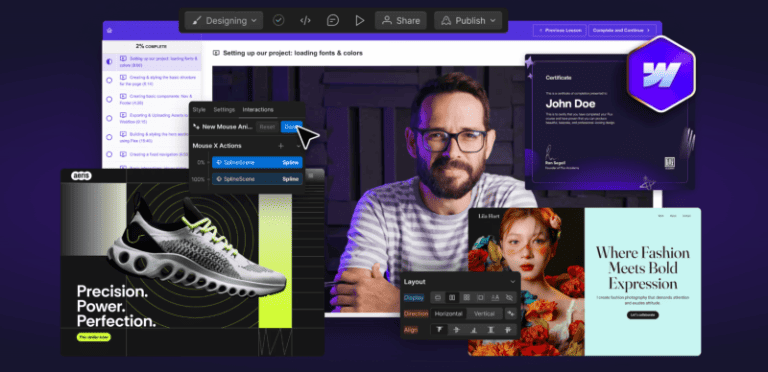
What is Ran Segall Webflow Masterclass 5.1 Pro for Cheap?
Here’s What You Get:
- Action-packed video lessons that teach Webflow through real client scenarios
- Hands-on practice with three full Webflow projects for both beginners and advanced users
- 8-week private mentoring and expert feedback from Flux Academy mentors
- Training led by industry expert and Flux Academy founder Ran Segall
- Lifetime access to all content and free updates as Webflow evolves
Webflow Masterclass 5.1 Pro is a comprehensive, hands-on course built for designers, creators, and freelancers who want to master Webflow and turn their skillset into high-value client work. Led by Ran Segall, the program goes beyond technical training by integrating real-world projects, business strategy, and mentorship.
Platform Overview & Structure
- Step-by-step video lessons that walk you through Webflow fundamentals and advanced features like interactions, grid, CMS, and animations
- Multiple hands-on projects where you build full websites from scratch
- Weekly office hours, private mentoring, and peer review to refine your skills
- Lifetime access to the entire curriculum and future course updates
Core Learning Focus
- Webflow basics: layout systems, flexbox, grid, responsive structure, and workflow
- Advanced features: dynamic content, CMS, interactions, animations, scalable systems
- Professional workflows: components, efficiency systems, and reusable design structures
- Business & freelancing modules including pricing, proposals, client onboarding, and delivery
Advantages & Key Benefits
- A complete all-in-one learning path suitable for beginners and advanced designers
- Project-based learning that builds real-world confidence and technical mastery
- Mentorship and community support to help troubleshoot challenges and accelerate progress
- Lifetime updates that ensure your skills evolve alongside Webflow’s latest features
- Business-focused training so you can turn Webflow mastery into client revenue
▶️ SAMPLE:
▶️ SAMPLE:
Ran Segall Webflow Masterclass 5.1 Pro Index:
📂 01-Webflow Masterclass 5.0 Pro Content
- 📂 01-Working with Clients Building Your Webflow Career
- 📄 01- Introduction Process Overview.pdf (15.16 KB)
- 📄 01-Introduction Process Overview.mp4 (45.47 MB)
- 📄 02- Effective Project Management- Notion Template Starter Project Communication Feedback.pdf (18.38 KB)
- 📄 02-Effective Project Management Notion Template Starter Project Com.mp4 (655.29 MB)
- 📄 03- Ultimate Webflow Build Checklist.pdf (15.22 KB)
- 📄 03-Ultimate Webflow Build Checklist.mp4 (950.53 MB)
- 📄 04- Pricing Proposals Closing Deals.pdf (15.82 KB)
- 📄 04-Flow Gurus – QUOTE TEMPLATE v1.0 COMMUNITY COPY.xlsx (99.65 KB)
- 📄 04-Pricing Proposals Closing Deals.mp4 (747.94 MB)
- 📄 05-Onboarding Managing Client Expectations.mp4 (451.86 MB)
- 📄 06- Lesson 6 Correcting Skintones.mp4 (1.10 GB)
- 📄 06- Transferring Project Smooth Launches.pdf (11.35 KB)
- 📄 06-Transferring Project Smooth Launches.mp4 (461.31 MB)
- 📄 07-3D Globe interaction.mp4 (10.48 MB)
- 📄 07-Client Training Handover Example videos.mp4 (320.67 MB)
- 📄 07-Customer reviews CMS slider.mp4 (38.49 MB)
- 📄 07-Heading text icon images.mp4 (7.33 MB)
- 📄 07-HiThrive update pricing.mp4 (8.12 MB)
- 📄 07-How to Add a New Progress or Update Article.mp4 (56.11 MB)
- 📄 07-How to Update Resources.mp4 (12.55 MB)
- 📄 07-June Lake – Welcome to Webflow.mp4 (96.77 MB)
- 📄 07-Supreme Skips – Updating-changing prices.mp4 (13.73 MB)
- 📄 07-Wedgetail – Upload blog post.mp4 (54.43 MB)
- 📄 08-Finding Retaining New Clients.mp4 (986.17 MB)
- 📄 09-Becoming a Webflow Expert.mp4 (407.50 MB)
- 📄 09-Becoming a Webflow Expert.pdf (11.09 KB)
- 📄 10-Scaling into a Webflow Agency.mp4 (594.46 MB)
- 📂 02-Working Together with Team Members
- 📄 01-Creating Managing Team Accounts.mp4 (820.40 MB)
- 📄 02-Establishing a Collaborative Workflow for Designers and Develope.mp4 (774.63 MB)
- 📄 02-Establishing a Collaborative Workflow for Designers and Developers.pdf (10.90 KB)
- 📄 02-Flow Gurus – Webflow Starter Kit.pdf (9.63 MB)
- 📄 03-Styling Structuring Considerations for Teams.mp4 (1.03 GB)
- 📄 04-Team Project Management Organization.mp4 (816.55 MB)
- 📂 03-Conclusion Whats Next
- 📄 01-Conclusion Whats Next.mp4 (44.50 MB)
- 📂 04-The Ultimate Webflow Build Checklist – PRO Course
- 📄 01- Introduction.mp4 (84.46 MB)
- 📄 02-Getting Started.mp4 (24.23 MB)
- 📄 03- Values and Principles.mp4 (152.09 MB)
- 📄 04-Client Onboarding.mp4 (180.12 MB)
- 📄 06- Review design.mp4 (583.73 MB)
- 📄 07- Plan fonts colors spacing.mp4 (70.31 MB)
- 📄 08-Export Figma assets.mp4 (136.36 MB)
- 📄 09- 301 redirects and URL map.mp4 (279.40 MB)
- 📄 09- 301 redirects and URL map.pdf (11.09 KB)
- 📄 10-Create Webflow account.mp4 (41.18 MB)
- 📄 11- Create Webflow project.mp4 (665.52 MB)
- 📄 12-Create MarkUp and Loom links.mp4 (18.53 MB)
- 📄 13- Import Figma assets.mp4 (28.69 MB)
- 📄 14- Set up ALL pages.mp4 (137.10 MB)
- 📄 15- Import Relume components.mp4 (370.68 MB)
- 📄 16- Style guide setup.mp4 (313.67 MB)
- 📄 17-Nav and footer links.mp4 (50.48 MB)
- 📄 18-Create DONE DONE DONE.mp4 (75.49 MB)
- 📄 19- Build easy.mp4 (271.93 MB)
- 📄 20- Build tricky.mp4 (234.75 MB)
- 📄 21-Technical SEO.mp4 (72.16 MB)
- 📄 22- Integrations and automations.mp4 (66.36 MB)
- 📄 23-Make it sexy.mp4 (159.32 MB)
- 📄 24- Clean up.mp4 (387.49 MB)
- 📄 25-Flow Gurus audit.mp4 (1.46 GB)
- 📄 26-MarkUp tweaks Client Review.mp4 (154.83 MB)
- 📄 27-Transfer.mp4 (529.27 MB)
- 📄 28-Set up hosting.mp4 (88.48 MB)
- 📄 29- Add 301 redirects.mp4 (86.94 MB)
- 📄 30- Pre-launch checks.mp4 (124.12 MB)
- 📄 31-Go live.mp4 (515.77 MB)
- 📄 32-Post-live testing.mp4 (94.36 MB)
- 📄 33- Handover.mp4 (606.24 MB)
- 📄 34-Post-live tweaks.mp4 (202.03 MB)
- 📄 35- Customer feedbac.mp4 (66.46 MB)
- 📄 36- Compile case study promote.mp4 (283.73 MB)
- 📄 37- 30 day review.mp4 (128.25 MB)
- 📄 38-Review and improve.mp4 (61.66 MB)
- 📂 05-Bonus
- 📄 01- How to automate customer feedback.pdf (10.60 KB)
- 📄 01-How to automate customer feedback.mp4 (136.36 MB)
📂 02-Webflow Masterclass 5.1
- 📂 01-Introduction
- 📄 01-Welcome How to Succeed in This Program.mp4 (256.67 MB)
- 📄 01-Welcome How to Succeed in This Program.pdf (20.99 KB)
- 📄 02-What Webflow subscription you need for this course.mp4 (128.46 MB)
- 📄 02-What Webflow subscription you need for this course.pdf (29.43 KB)
- 📄 03- Introduction to Webflow UI UI Updates.pdf (18.83 KB)
- 📄 03-How to send us a sandbox link aka the old read-only link – 24 Octo.mp4 (13.16 MB)
- 📄 03-Introduction to Webflow UI UI Updates.mp4 (237.26 MB)
- 📄 04- How does mentoring work.pdf (43.09 KB)
- 📂 02-Web Design Concepts You MUST Understand to succeed with Webflow
- 📄 01- What is HTML-CSS.pdf (13.74 KB)
- 📄 01-What is HTMLCSS.mp4 (258.94 MB)
- 📄 02-How Content Flows on the Web.mp4 (104.12 MB)
- 📄 03-The Box Model.mp4 (109.29 MB)
- 📄 04-Nesting Cascading.mp4 (199.06 MB)
- 📄 04-Webflow Beginner Series 4 – The Cascading Down Principle.mp4 (206.24 MB)
- 📄 05-How Styling Works Global Classes Combo Classes HTML Tags.mp4 (295.37 MB)
- 📄 06- How to use Flex AKA Auto-Layout.pdf (20.99 KB)
- 📄 06-Flexbox Horizontal Masonry Layout in Webflow No Code Tutorial Fully Responsive Accessible.mp4 (784.51 MB)
- 📄 06-How to use Flex AKA Auto-Layout.mp4 (185.03 MB)
- 📄 06-Webflow Flexbox Design Patterns.mp4 (519.63 MB)
- 📄 07-Webflow Beginner Series 2 – Sections Containers Div Blocks Debunked.mp4 (178.25 MB)
- 📄 07-Why we use wrappers.mp4 (106.82 MB)
- 📄 08-The Right Structure for EVERY Page.mp4 (214.68 MB)
- 📄 09-Measurements Pixels VWVH EMREM.mp4 (219.36 MB)
- 📄 10-What are variables Flux Academy.mp4 (120.45 MB)
- 📂 03-Building Strong Foundations
- 📄 01- Assets for this module.pdf (25.86 KB)
- 📄 01-Prtfolio-assets.zip (59.93 MB)
- 📄 01-WFM5 – Level 1 – CMS Content.docx (7.98 KB)
- 📄 01-WFM5 Fundations STUDENTS.pdf (36.10 MB)
- 📄 02-Setting up our project loading fonts colors.mp4 (313.92 MB)
- 📄 02-Webflows Workspace Plans Explained To My Hypothetical 10-year-old Daughter.mp4 (180.99 MB)
- 📄 03-Creating styling the basic structure for the page.mp4 (312.81 MB)
- 📄 04-Creating basic components Nav Footer.mp4 (160.04 MB)
- 📄 05- Exporting Uploading Assets to Webflow.pdf (22.08 KB)
- 📄 05-Exporting Uploading Assets to Webflow.mp4 (352.82 MB)
- 📄 06-Building styling the hero section using Flex.mp4 (609.72 MB)
- 📄 07-Creating a fixed navigation.mp4 (279.35 MB)
- 📄 08-Basic interactions Hover states.mp4 (271.84 MB)
- 📄 09-Creating a bento design using Grid Utility Classses.mp4 (738.34 MB)
- 📄 09-Webflows Navbar Mega Menu – Ep 1- Desktop Structure Hover Interactions No Code Tutorial.mp4 (1.06 GB)
- 📄 10-Understanding Webflows CMS.mp4 (285.37 MB)
- 📄 11-Setting up a basic CMS Projects collections.mp4 (486.99 MB)
- 📄 12-Creating the projects section using the Collection list.mp4 (604.98 MB)
- 📄 12-Creating the projects section using the Collection list.pdf (17.61 KB)
- 📄 13-Advanced Styling Even CMS Item Flip using Flex.mp4 (196.59 MB)
- 📄 14-Creating a static page template.mp4 (100.77 MB)
- 📄 15-CSS Positioning in Webflow Everything You Need to Know.mp4 (1.30 GB)
- 📄 15-Intro to Position Absolute.mp4 (66.37 MB)
- 📄 16-Projects Page – Projects Page Overlays.mp4 (802.49 MB)
- 📄 17-Project case study using the collection page.mp4 (570.68 MB)
- 📄 18-Creating a sticky element.mp4 (124.30 MB)
- 📄 18-Webflow Beginner Series 1 – Sticky vs Overflow.mp4 (118.28 MB)
- 📄 19-Creating a testimonial slider.mp4 (499.02 MB)
- 📄 20-Working with backgrounds.mp4 (105.23 MB)
- 📄 21-Creating the About page.mp4 (313.66 MB)
- 📄 22-Creating Using forms.mp4 (325.24 MB)
- 📄 22-Finsweet Mirror Input Values- Create Real-Time Dynamic Inputs in Webflow Tutorial.mp4 (593.23 MB)
- 📄 23-Dropdowns Open Automatically On Load Scroll Or Link Click Webflow Tutorial Attributes-Only.mp4 (718.70 MB)
- 📄 23-How To Deal With Webflow Animations.mp4 (416.73 MB)
- 📄 23-Intro to Interactions Creating an Accordion for the FAQ.mp4 (720.05 MB)
- 📄 24-Creating component variations nav footer button.mp4 (498.75 MB)
- 📄 25- Four Techniques for Scrolling Animations.mp4 (600.19 MB)
- 📄 25-4 Logo And Text Webflow Scroll Animations You Can Create Without Code Tutorial.mp4 (726.78 MB)
- 📄 26-Disable Page Scrolling in Webflow Without JavaScript Just One CSS Rule Tutorial.mp4 (154.30 MB)
- 📄 26-Making the Website Responsive Flux Academy.mp4 (1.14 GB)
- 📄 27-Mobile Navigation.mp4 (427.92 MB)
- 📄 28-Adding Custom code to refine the font using ChatGPT.pdf (20.87 KB)
- 📄 28-Adding Custom code to refine the font using ChatGPTw.mp4 (229.28 MB)
- 📄 29-Understanding Accessibility in Webflow.mp4 (426.99 MB)
- 📄 30- Privacy Considerations.pdf (17.64 KB)
- 📄 30-Privacy Considerations.mp4 (403.40 MB)
- 📄 31-SEO Basics in Webflow.mp4 (314.60 MB)
- 📄 31-SEO Basics in Webflow.pdf (17.30 KB)
- 📄 32-Final sets publishing hosting client handover.mp4 (398.70 MB)
- 📄 33-Conclusion Skill Verification.mp4 (23.69 MB)
- 📄 33-SEO Basics in Webflow.pdf (17.88 KB)
- 📂 04-Creative Development- Building Award Winning Websites
- 📄 01-Aeris assets.zip (15.25 MB)
- 📄 01-Assets for this module.pdf (20.17 KB)
- 📄 01-WFM5 – Creative Dev STUDENTS.pdf (5.84 MB)
- 📄 02- Intro to Animation Types.pdf (13.51 KB)
- 📄 02-Intro to Animation Types.mp4 (147.78 MB)
- 📄 03-Reviewing design assets planning the build.mp4 (119.79 MB)
- 📄 04-Building the hero section layout.mp4 (361.60 MB)
- 📄 05-Animating the 3D Spline shoe.mp4 (189.35 MB)
- 📄 05-Animating the 3D Spline shoe.pdf (27.45 KB)
- 📄 05-scene.splinecode.json (277.96 KB)
- 📄 06-GSAP Text Animations.mp4 (118.26 MB)
- 📄 07-Hero Responsiveness.mp4 (479.08 MB)
- 📄 07-Hero Responsiveness.pdf (15.84 KB)
- 📄 08-Planning a custom menu.mp4 (302.45 MB)
- 📄 08-Planning a custom menu.pdf (19.36 KB)
- 📄 09-Building Animating a custom hamburger menu.mp4 (221.64 MB)
- 📄 10-Building Full screen menu layout.mp4 (136.22 MB)
- 📄 11-Animating the full screen menu.mp4 (84.18 MB)
- 📄 12-Menu Responsiveness.mp4 (162.73 MB)
- 📄 13-Designing and animating the features section.mp4 (420.07 MB)
- 📄 13-Webflow While-Scrolling Animation Masterclass 1- Card 3D Scroll Interaction Tutorial.mp4 (440.72 MB)
- 📄 14-Features section – Responsiveness.mp4 (163.25 MB)
- 📄 15-Creating 3D card components.mp4 (470.97 MB)
- 📄 16-Building a horizontal scrolling section.mp4 (343.96 MB)
- 📄 17-Cards section – Responsiveness.mp4 (169.11 MB)
- 📄 18-Creating an infinite marquee.mp4 (246.83 MB)
- 📄 18-Webflow Infinite Draggable Marquee With Stop On Hover No-Code Tutorial Attributes-Only Solution.mp4 (206.56 MB)
- 📄 19-Adding a video background.mp4 (124.71 MB)
- 📄 20-Responsive Typography.mp4 (188.88 MB)
- 📄 21-Adding Countdown Timer Functionality.mp4 (237.74 MB)
- 📄 21-Adding Countdown Timer Functionality.pdf (22.92 KB)
- 📄 21-The last countdown timer component you need for Webflow.mp4 (251.56 MB)
- 📄 22-Building CTA the Footer.mp4 (740.57 MB)
- 📄 23-Animating the Footer.mp4 (394.81 MB)
- 📄 24-Footer responsivenes.mp4 (774.90 MB)
- 📄 25-Build a pre-loader.mp4 (656.19 MB)
- 📄 26-CTA button animation.mp4 (287.77 MB)
- 📄 27-Conclusion Skill Verification.mp4 (26.33 MB)
- 📄 27-Conclusion Skill Verification.pdf (13.69 KB)
- 📂 05-Scaling Up Frameworks Components for Big Websites
- 📄 01- Assets for this module.pdf (20.62 KB)
- 📄 01-Atalie Axiom – assets.zip (32.64 MB)
- 📄 01-Events-Grid view.csv (16.31 KB)
- 📄 02-Big Websites Understanding the opportunity challenges.mp4 (507.98 MB)
- 📄 03-Why how to use a style guide.mp4 (240.05 MB)
- 📄 04- Development Frameworks Intro to Client-First.pdf (19.29 KB)
- 📄 04-Development Frameworks Intro to Client-First Video Links.mp4 (663.29 MB)
- 📄 04-Mast — A CSS Framework for Webflow.mp4 (12.57 MB)
- 📄 05- Libraries- Intro to Relume.pdf (16.49 KB)
- 📄 05-Libraries Intro to Relume.mp4 (632.17 MB)
- 📄 06-Importing a Relume website to Webflow.mp4 (557.35 MB)
- 📄 06-Importing a Relume website to Webflow.pdf (16.94 KB)
- 📄 07-Customising the Style Guide.mp4 (772.11 MB)
- 📄 08-Importing a Relume website to Webflow.pdf (17.29 KB)
- 📄 08-Importing variables from Figma using Webflows plugin.mp4 (154.89 MB)
- 📄 09- Importing complex CMS from Airtable using CMS Bridge.pdf (22.71 KB)
- 📄 09-Getting started with Webflows MCP server.mp4 (858.41 MB)
- 📄 09-Importing complex CMS from Airtable using CMS Bridge.mp4 (300.88 MB)
- 📄 10-Binding Relume components to CMS data.mp4 (561.64 MB)
- 📄 11-Creating a CMS Slider.mp4 (505.26 MB)
- 📄 12-Simple CMS filtering using Tabs.mp4 (664.26 MB)
- 📄 13- Complex CMS filtering using Finsweet attributes.pdf (24.98 KB)
- 📄 13-Complex CMS filtering using Finsweet attributes.mp4 (1.09 GB)
- 📄 13-Finsweet filters v2 – 14 August 2025.mp4 (647.86 MB)
- 📄 14-Building your component library.mp4 (1016.32 MB)
- 📄 15-Building page templates using slots.mp4 (303.57 MB)
- 📄 16- Creating a save my spot pop-up with Dynamic Content.pdf (25.96 KB)
- 📄 16-Creating a save my spot pop-up with Dynamic Content.mp4 (522.51 MB)
- 📄 17-Connecting a form to an external CRM using Zapier.mp4 (402.37 MB)
- 📄 18-Designing the Mega Nav.mp4 (1.83 GB)
- 📄 19-Adding Assets Connecting buttons Cleanup.mp4 (106.02 MB)
- 📄 20-Absolute Backgrounds.mp4 (678.89 MB)
- 📄 21-Creating CTA Button Component.mp4 (207.72 MB)
- 📄 22-Conclusion Skill Verification.mp4 (33.98 MB)
- 📂 06-Certification Project
- 📄 01-Your Certification Assignment.docx (9.70 KB)
- 📄 01-Your Certification Assignment.mp4 (74.02 MB)
- 📂 07-Conclusion Whats next
- 📄 01- Conclusion Whats next.mp4 (88.37 MB)
- 📂 08-Bonus Build – Yoga Studio Relume E-commerce
- 📄 01- What were building learning in this level.pdf (16.48 KB)
- 📄 02- Assets Relume Access.pdf (28.83 KB)
- 📄 02-Level 2.zip (13.42 MB)
- 📄 02-WFM4 – Level 2 – Yoga Studio Relume Kit – Course Link.pdf (8.56 MB)
- 📄 02-WFM4 – Level 2_ CMS Content.docx (286.97 KB)
- 📄 03- Working with Libraries Relume.pdf (22.85 KB)
- 📄 04-Setting up the Website Project CMS.pdf (16.09 KB)
- 📄 05-Defining the Style Guide.pdf (14.94 KB)
- 📄 06- Importing the Content Components.pdf (27.14 KB)
- 📄 07-Customising Home Page.pdf (14.58 KB)
- 📄 08-CMS Classes Page.pdf (24.17 KB)
- 📄 09- CMS- Class Details Dynamic Booking Popup.pdf (25.24 KB)
- 📄 10- CMS- Instructors.pdf (12.33 KB)
- 📄 11- E-commerce- Yoga Handbook.pdf (14.99 KB)
- 📄 12- Adding Interactions Animations.pdf (29.49 KB)
- 📄 12-Adding Interactions Animations.mp4 (1.48 GB)
- 📄 13- Adding 3D Spline object Interaction.pdf (15.49 KB)
- 📄 14- Reviewing Responsiveness.pdf (14.38 KB)
- 📄 15-Accessibility Privacy.pdf (19.16 KB)
- 📂 09-Bonus Build – Sport Events Video Membership Site
- 📄 01-What were building learning in this level.mp4 (190.75 MB)
- 📄 01-What were building learning in this level.pdf (16.41 KB)
- 📄 02-Assets for this level.pdf (17.47 KB)
- 📄 02-Level 3.zip (351.63 MB)
- 📄 02-WFM4 – Level 3 – SportLink – Course Copy.pdf (60.81 MB)
- 📄 03-CMS Setup Content Import.mp4 (359.60 MB)
- 📄 03-CMS Setup Content Import.pdf (11.72 KB)
- 📄 04-CMS Setup Content Import.pdf (13.65 KB)
- 📄 04-Setting up a custom style guide.mp4 (681.27 MB)
- 📄 05-Building the hero section.mp4 (660.06 MB)
- 📄 05-Building the hero section.pdf (11.54 KB)
- 📄 06-Hero animation preloader.mp4 (679.81 MB)
- 📄 06-Hero animation preloader.pdf (21.51 KB)
- 📄 06-Webflow – WFM4 – 3 3 – Hero Nav animation – 28 October 2023.mp4 (34.53 MB)
- 📄 07- Building the mega menu.pdf (25.23 KB)
- 📄 07-Building the mega menu.mp4 (855.75 MB)
- 📄 08- Building the mega menu.pdf (11.67 KB)
- 📄 08-Marquee Scroll Section.mp4 (296.62 MB)
- 📄 09- Building a CMS Slider.pdf (12.45 KB)
- 📄 09-Building a CMS Slider.mp4 (1.12 GB)
- 📄 10- Members Only Section.pdf (11.62 KB)
- 📄 10-Members Only Section.mp4 (676.07 MB)
- 📄 11- Building Calendar Grid.pdf (11.67 KB)
- 📄 11-Building Calendar Grid.mp4 (778.17 MB)
- 📄 12- Using Finsweet CMS Filtering.pdf (13.30 KB)
- 📄 12-Using Finsweet CMS Filtering.mp4 (174.33 MB)
- 📄 13- Building Footer.pdf (11.50 KB)
- 📄 13-Building Footer.mp4 (458.90 MB)
- 📄 14-Building Video Library.docx (211.82 KB)
- 📄 14-Building Video Library.mp4 (724.16 MB)
- 📄 15-Building Membership Site using Memberstack.mp4 (641.30 MB)
- 📄 15-Building Membership Site using Memberstack.pdf (11.94 KB)
- 📄 16-Responsiveness Final Touches.mp4 (1.01 GB)
- 📄 16-Responsiveness Final Touches.pdf (14.29 KB)
- 📄 17-Adding Multiple Languages with Localization.mp4 (195.16 MB)
📂 03-Webflow Masterclass 5.1 Pro
- 📄 01-Webflow Masterclass 5.1.pdf (14.07 KB)
- 📄 02- Webflow Masterclass Pro Content.pdf (14.98 KB)
 Feel free to reach out to our CHAT support for personalized assistance and detailed information tailored to your needs. We’re here to help!